Incorrect Photo
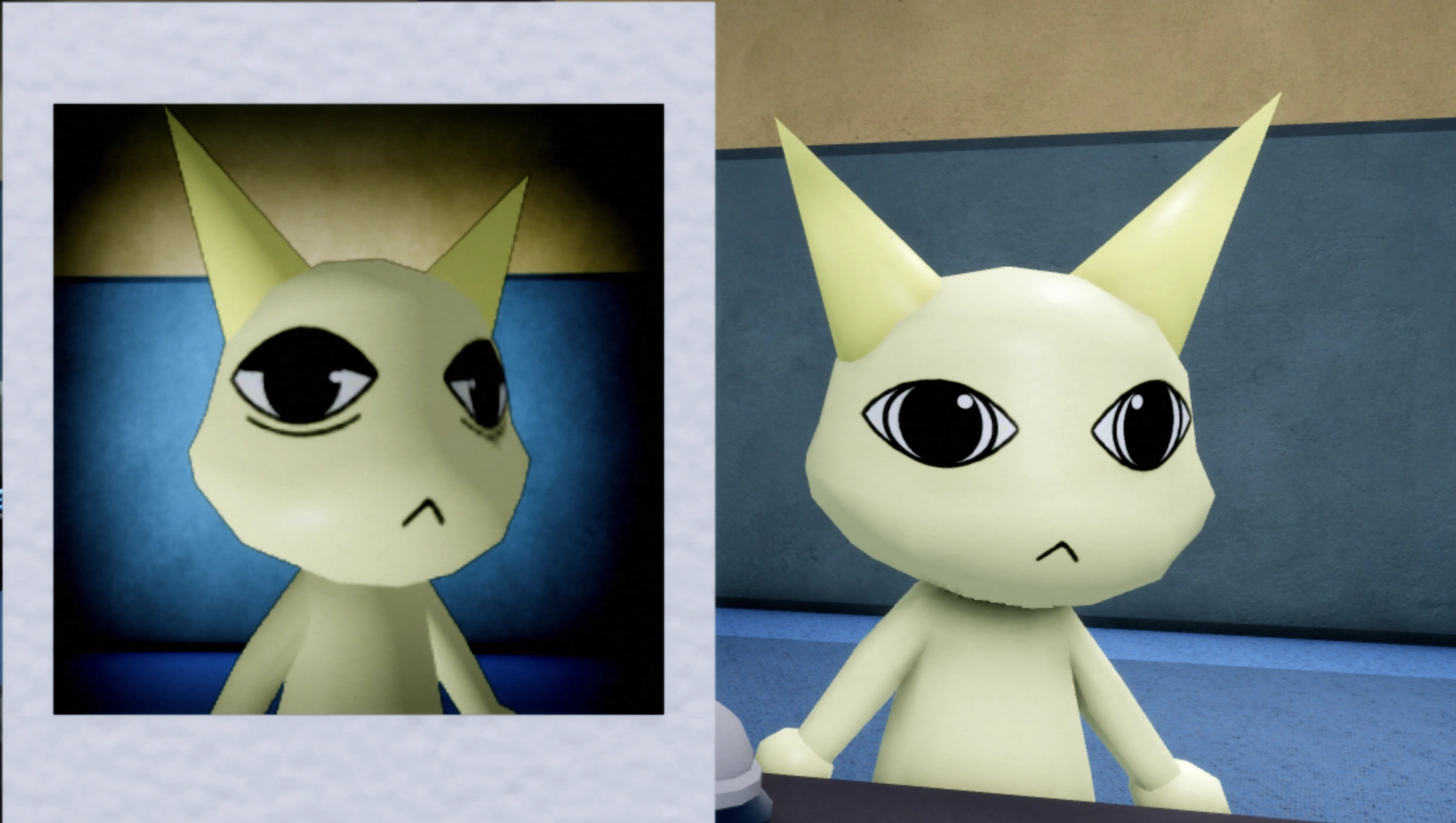
Incorrect Photo is a photo-layer anomaly. The species may still look correct, so compare the patient's face and ears instead of checking only the animal type.
Quick Answer
Different face, eye or mouth shape, ear shape, ear color, or another visible difference between the photo and the patient.
Compare the clipboard photo to the patient at the window. Reject when any confirmed model detail does not match.
What Incorrect Photo actually is
Incorrect Photo is a photo-layer anomaly in which the clipboard photo and the live patient disagree. The mismatch can be a different face, a different eye or mouth shape, a different ear shape, or a different ear colour. The patient itself may look entirely normal, which means the anomaly exists only in the comparison between two things.
When it shows up
It appears on ordinary arrivals with no cue. Because the live patient is often convincing on its own, this entry is only detectable by doing the cross-check that players skip when a patient looks plausible.
Which layer catches it
The clipboard photo against the patient at the window. The recorded handling is explicit: compare the photo to the patient, and reject when any confirmed model detail does not match. The photo is the layer, and the comparison is the method.
How Incorrect Photo reads in each layer
| Detection layer | What you see |
|---|---|
| Window | Only half the evidence. The patient can look completely normal here, which is why a clean window view must not be treated as a pass. |
| Clipboard photo | The primary layer. Read the photo as a set of discrete features — ear shape, ear colour, eye shape, mouth shape, face shape — rather than as a general impression. |
| CCTV | Supporting evidence. The camera can show which of the two images the live patient actually resembles, which is useful when the mismatch is subtle. |
| Document | Not part of this entry’s check, though documents are a separate detection layer used elsewhere. |
Step-by-step: a real Incorrect Photo encounter
- A patient arrives and the live model matches its baseline on species, colour, and build.
- You open the clipboard rather than treating the visual check as complete.
- You read the photo feature by feature. The ear shape is shorter than the live patient’s, and the ear colour differs slightly.
- You compare the live patient against the camera feed to confirm which version is on the ward.
- You reject, because a confirmed model detail does not match the photo.
False positives
Normal things players reject by mistake while hunting this entry.
- Rejecting a patient because the photo is low quality or oddly lit. The tell is a specific changed feature, not a bad image.
- Comparing the photo as a whole image instead of feature by feature, which lets a subtle ear or eye change pass.
- Clearing the patient because the live model looked right, which is precisely what this entry is built to exploit.
- Confusing it with Static Photo, where the photo is entirely replaced rather than differing in detail.
Often confused with
Entries that share a tell with this one, and how to separate them.
- Frequently confused with Static Photo; the separation is that here the photo shows a patient, just not the right one, whereas Static Photo shows no patient image at all.
- Shares the mismatched-ear tell with Mismatching Ears, which compares the window to the CCTV feed rather than to the photo.
- Because it does not alter the live patient, it can present on any baseline and passes every check that does not read the clipboard.
What a wrong call costs
The cost is a failed arrival caused by skipping a comparison that takes seconds. This entry is the single strongest argument for reading the clipboard on every patient, because a player who only inspects the live model has no way to detect it at all and will experience the failure as unexplained.
Recorded appearance and response
Appearance: Something in the patient's photo differs from the real patient, such as the face, ears, ear color, or other model details.
Tell signs: Different face, eye or mouth shape, ear shape, ear color, or another visible difference between the photo and the patient.
How to handle: Compare the clipboard photo to the patient at the window. Reject when any confirmed model detail does not match.
Last re-checked against the live game on September 16, 2026. Last verified 35 days ago — re-check pending.
Incorrect Photo FAQ
What counts as a mismatch for Incorrect Photo?
Any confirmed model detail: a different face, a different eye or mouth shape, a different ear shape, or a different ear colour. The recorded handling is to reject when any confirmed detail does not match, so the threshold is one clear difference, not several.
The live patient looks perfect. Is that enough?
No. On this entry the live patient is often convincing by design; the anomaly lives in the comparison. A clean window view without a clipboard read leaves this entry completely undetected.
How is this different from Static Photo?
Static Photo replaces the photo with static, snow, or a blank frame, so there is no patient image to compare. Incorrect Photo shows a patient in the photo, just not one that matches the patient in front of you.
Should I check the camera as well?
It helps when the mismatch is subtle, because the feed shows which of the two images the live patient actually resembles. It is supporting evidence rather than the deciding layer.