Mimic
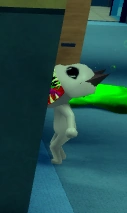
Mimic is a high-risk camera anomaly. It can be difficult to identify through the check-in camera, so a lobby-side view or Deployable Camera gives a better angle.
Quick Answer
Mimic form visible on CCTV, camera-only twitching, or a monstrous form that is absent at the window and in the photo.
Use the lobby camera or a Deployable Camera to confirm the Mimic form, then reject before treatment. Follow the separate Skinwalker enemy guide when the game identifies the threat as a Skinwalker.
What Mimic actually is
Mimic is an S-tier skinwalker-category entry in which a monstrous form is visible on the CCTV feed while the patient looks normal at the window and in the photo. It is the highest-tier anomaly on the site and the one most often missed by players who treat the camera as optional, because every other layer will look clean.
When it shows up
It appears on ordinary arrivals, including the most common baselines. The entrance is designed around the assumption that players trust a clean window view, and the recorded tells are a Mimic form on the feed, camera-only twitching, and a monstrous shape that is absent at the window and in the photo.
Which layer catches it
The CCTV feed, using the lobby camera or a Deployable Camera. The recorded handling requires confirming the Mimic form on camera and rejecting before treatment, then following the separate Skinwalker enemy guide when the game identifies the threat as a Skinwalker — which is a different response from a routine rejection.
How Mimic reads in each layer
| Detection layer | What you see |
|---|---|
| Window | Normal. This layer will actively mislead you if you treat it as the deciding check. |
| Clipboard photo | Normal. A clean photo is fully compatible with a Mimic on the feed, so the photo must not be used to overrule the camera. |
| CCTV | The primary and only reliable layer. Look for a monstrous form, camera-only twitching, or a shape that does not correspond to the patient standing in the room. |
| Document | Not part of the recorded check. Documents will not identify a Mimic. |
Step-by-step: a real Mimic encounter
- A patient arrives and the window view matches its baseline exactly.
- You check the clipboard photo. It matches too.
- You still check the camera, because a clean window and photo do not clear a camera-layer entry.
- The feed shows camera-only twitching and a monstrous form that does not correspond to the patient standing in the room.
- You reject before treatment. If the game identifies the threat as a Skinwalker rather than an anomaly, you switch to the separate Skinwalker response instead of treating it as a routine rejection.
False positives
Normal things players reject by mistake while hunting this entry.
- Rejecting on camera-only twitching alone without confirming a Mimic form, when that pattern also matches Camera Twitching.
- Clearing the patient because the window view and photo both looked perfect, which is the documented failure mode.
- Treating every skinwalker-adjacent reading as a routine rejection when the recorded guidance distinguishes the Skinwalker case and points to a separate response.
- Assuming the anomaly is limited to rare patients when it can present on the most common baselines.
Often confused with
Entries that share a tell with this one, and how to separate them.
- Frequently confused with Camera Twitching, which is a lower-tier camera-only distortion without a monstrous form.
- Connected to the Skinwalker enemy entry: the recorded handling says to follow the separate Skinwalker guide when the game identifies the threat as a Skinwalker, which is a distinct escalation from rejecting an anomaly.
- Because White Cat is one of the most frequently imitated baselines, this entry is a live risk on the patient players check most often.
What a wrong call costs
This is the most expensive single mistake on the list. Every layer except the camera passes, so the wrong call is made from genuinely clean evidence and produces a failure the player cannot reconstruct afterwards. On a Journal run it also forfeits the reward attached to correctly handling the entry, and mishandling the Skinwalker escalation is a separate and larger problem than a failed arrival.
Recorded appearance and response
Appearance: The patient appears as a Mimic only on security cameras, while the window and photo may look normal.
Tell signs: Mimic form visible on CCTV, camera-only twitching, or a monstrous form that is absent at the window and in the photo.
How to handle: Use the lobby camera or a Deployable Camera to confirm the Mimic form, then reject before treatment. Follow the separate Skinwalker enemy guide when the game identifies the threat as a Skinwalker.
Last re-checked against the live game on September 16, 2026. Last verified 35 days ago — re-check pending.
Mimic FAQ
Why is Mimic rated S tier?
Because it defeats the layers players trust most. The window view and the clipboard photo can both be completely clean while the camera feed shows the Mimic form, so the usual early-exit logic fails and the wrong call is made from evidence that genuinely looked fine.
Can Mimic appear on common patients?
Yes. It is not restricted to rare arrivals, and White Cat in particular is one of the baselines most frequently imitated. Checking only unusual patients will not protect you against this entry.
What is the difference between Mimic and a Skinwalker?
The recorded handling treats them as separate cases. A Mimic is confirmed on camera and rejected before treatment, while the guidance says to follow the separate Skinwalker enemy guide when the game identifies the threat as a Skinwalker. Read the threat label rather than assuming.
How is Mimic different from Camera Twitching?
The form. Camera Twitching is motion artefacts on the feed with the patient otherwise unchanged, while a Mimic shows a monstrous form that is absent at the window and in the photo. Twitching alone is not enough to call a Mimic.